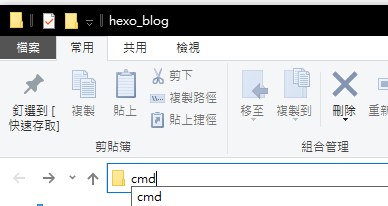
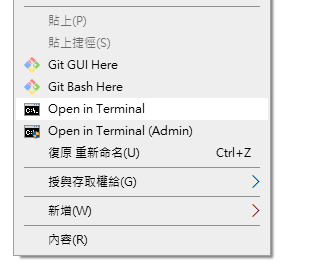
; Right click on a folder in a directory. [HKEY_CLASSES_ROOT\Directory\shell\OpenCommandWindowHereAsAdministrator] @="Open in Terminal (Admin)" "Icon"="cmd.exe" "HasLUAShield"="" "Position"="middle" [HKEY_CLASSES_ROOT\Directory\shell\OpenCommandWindowHereAsAdministrator\command] @="cmd.exe /c powershell.exe -Command \"Start-Process cmd -Verb runas -ArgumentList '/k pushd \"%1\"'\""
; Right click on nothing in a directory, i.e. the "background" of the directory. [HKEY_CLASSES_ROOT\Directory\Background\shell\OpenCommandWindowHereAsAdministrator] @="Open in Terminal (Admin)" "Icon"="cmd.exe" "HasLUAShield"="" "Position"="middle" [HKEY_CLASSES_ROOT\Directory\Background\shell\OpenCommandWindowHereAsAdministrator\command] @="cmd.exe /c powershell.exe -Command \"Start-Process cmd -Verb runas -ArgumentList '/k pushd \"%V\"'\""
; Right click on nothing in a library directory, i.e. the "background" of the library directory. [HKEY_CLASSES_ROOT\LibraryFolder\Background\shell\OpenCommandWindowHereAsAdministrator] @="Open in Terminal (Admin)" "Icon"="cmd.exe" "HasLUAShield"="" "Position"="middle" [HKEY_CLASSES_ROOT\LibraryFolder\Background\shell\OpenCommandWindowHereAsAdministrator\command] @="cmd.exe /c powershell.exe -Command \"Start-Process cmd -Verb runas -ArgumentList '/k pushd \"%V\"'\""
; Right click on a file in a directory. [HKEY_CLASSES_ROOT\*\shell\OpenWithCommandWindowAsAdministrator] @="Open in Terminal (Admin)" "Icon"="cmd.exe" "HasLUAShield"="" "Position"="middle" [HKEY_CLASSES_ROOT\*\shell\OpenWithCommandWindowAsAdministrator\command] @="cmd.exe /c powershell.exe -Command \"Start-Process cmd -Verb runas -ArgumentList '/k pushd \\\"%W \\\" && \\\"%1\\\"'\""
; Non-Admin versions.
; Right click on a folder in a directory. [HKEY_CLASSES_ROOT\Directory\shell\OpenCommandWindowHere] @="Open in Terminal" "Icon"="cmd.exe" "Position"="middle" [HKEY_CLASSES_ROOT\Directory\shell\OpenCommandWindowHere\command] @="cmd.exe /k pushd \"%1\""
; Right click on nothing in a directory, i.e. the "background" of the directory. [HKEY_CLASSES_ROOT\Directory\Background\shell\OpenCommandWindowHere] @="Open in Terminal" "Icon"="cmd.exe" "Position"="middle" [HKEY_CLASSES_ROOT\Directory\Background\shell\OpenCommandWindowHere\command] @="cmd.exe /k pushd \"%V\""
; Right click on nothing in a library directory, i.e. the "background" of the library directory. [HKEY_CLASSES_ROOT\LibraryFolder\Background\shell\OpenCommandWindowHere] @="Open in Terminal" "Icon"="cmd.exe" "Position"="middle" [HKEY_CLASSES_ROOT\LibraryFolder\Background\shell\OpenCommandWindowHere\command] @="cmd.exe /k pushd \"%V\""
; Right click on a file in a directory. [HKEY_CLASSES_ROOT\*\shell\OpenWithCommandWindow] @="Open in Terminal" "Icon"="cmd.exe" "Position"="middle" [HKEY_CLASSES_ROOT\*\shell\OpenWithCommandWindow\command] @="cmd.exe /k pushd \"%W\" && \"%1\""